Baby Panda's Supermarket
BabyBusEducational
4.62.73K Reviews
- Version
- 8.75.46.01
- Installs
- 100.00M
- Age Rating
- Everyone
Screenshots

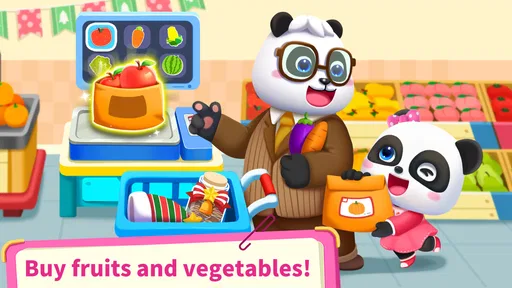
Our Review of Baby Panda's Supermarket
 Analysis by Appyee
When a child wants to play shop, I like the idea of turning that familiar bit of pretend into a small activity with a purpose. Baby Panda's Supermarket is an educational game from BabyBus, built around shopping and cashier play. Its cheerful setup suits young children who enjoy choosing food, handling simple tasks, and making sense of what happens at a grocery store. I’d treat it as a playful starting point for learning, not as a substitute for a real conversation or hands-on practice.
Who may enjoy playing shop
The game is an especially natural fit for a child who already likes coming along on grocery trips, helping unpack food, or pretending to run a shop with toys. A supermarket setting gives those interests somewhere to go: a child can encounter familiar kinds of tasks in a playful setting, then connect them to everyday life. I can see it working well as a short activity before dinner or while an adult is nearby doing a household task.
It may be less satisfying for children who want a detailed simulation, long-term goals, or a demanding challenge. The appeal here is accessible, child-oriented play. If your child prefers open-ended building, competitive action, or a game with a more intricate strategy, a different type of game will likely hold their attention better. I’d also stay involved if a young player needs help understanding an instruction or is still learning to use a touchscreen.
A useful way to make the play more meaningful
Rather than handing over the device and expecting it to teach by itself, I’d use a few ordinary questions to connect the game to real shopping: “Which of these foods have we bought before?” or “What should we put in the basket for lunch?” That small bit of conversation can turn recognition into a chance to explain choices, without making play feel like a lesson. It also gives an adult a clearer sense of what the child is noticing.
Another practical approach is to let the child lead the pretend role, then switch roles together. A child can act as the shopper while an adult plays cashier, or the other way around, using the game as a prompt for talking through taking turns and what happens at checkout. This is a simple way to keep the experience social. It also helps when a child enjoys the supermarket theme but isn’t ready to explore every screen alone.
What to expect from the purchase setup
The game is free to download, and it carries an Everyone age rating. There are in-app purchases priced from $0.49 to $5.49 per item, so I would not assume that every optional item or activity is included at no cost. If a child uses the device, I recommend checking purchase controls beforehand and supervising any screen that asks for a payment decision. That is a more reliable safeguard than assuming a child-facing game cannot present a spending prompt.
The purchase range gives a useful boundary, but it does not tell me what each item contains or whether a particular purchase is necessary for the basic experience. I would make the first session a chance to see how the child responds before spending anything. If the free play already suits them, there may be no reason to buy more. If an item is presented as tempting or confusing, pause and decide together rather than letting a young player make the choice.
Welcome to the Aisles of Fun
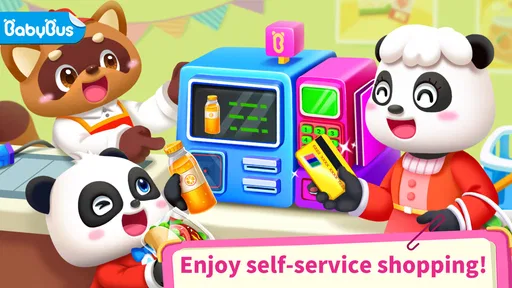
Right off the bat, Baby Panda's Supermarket greets you with a cheerful panda host and a bustling market setting. The interface is super user-friendly, thanks to its bright colors and intuitive design. The app is packed with numerous mini-games that mimic real-life shopping tasks, which are perfect for keeping the little ones engaged.
Kids can fill their shopping carts with a variety of virtual groceries, like fresh fruits, veggies, and even some sweet treats. The app cleverly integrates educational elements, so while your child is busy having fun, they’re also learning to recognize different foods and understanding basic shopping concepts.
Shopping Made Fun and Educational
One of the coolest features of Baby Panda's Supermarket is its focus on education through play. Each shopping trip is an opportunity for your child to improve their decision-making skills and learn about healthy food choices. Plus, the app has delightful audio cues and animations that celebrate each successful task, fostering a sense of achievement.
The variety of tasks is impressive. Kids can sort items, weigh fruits, and even help with checkout, simulating a real shopping experience. The app also introduces basic math skills, as kids calculate totals and handle transactions. It’s a clever way to sneak in some learning without it feeling like a chore.
Learning without turning play into a test
Sorting, weighing, and checkout offer different kinds of practice, so I’d pay attention to which task a child chooses to repeat. Sorting is a gentle entry point for matching and categorizing; weighing can prompt a conversation about heavier and lighter; checkout is the clearest opening for talking about numbers and exchanging money. A parent can follow the child’s interest instead of trying to cover every activity in one sitting.
There is a trade-off, though: a game can make an idea familiar without teaching it in a complete or transferable way. A child who taps through a transaction may enjoy the sequence but still need a real-world explanation of what money is for. I’d use the supermarket play as a springboard, then reinforce the idea with a pretend basket at home or a calm, brief conversation during an actual shop.
Taking turns and keeping the session calm
For a shared session, I’d agree on a simple turn-taking pattern before opening the game: one person chooses an item, then the other gets a turn. That can prevent an eager child from feeling that the adult is taking over, while still giving a caregiver an easy way to join in. It also makes the game more useful for siblings who want to play together, even if they are interested in different tasks.
If the child becomes focused on tapping quickly rather than noticing the supermarket activities, I would slow the session down with one question at a time. Asking what they are putting in the cart or what happens next can make the play more thoughtful without adding rules. Conversely, if a child is already comfortable navigating the game, they may prefer to explore independently while an adult stays available nearby.
A Safe and Kid-Friendly Environment
As a parent, one of the things I appreciate most about this app is its safe environment. There are no third-party ads or in-app purchases that might lead to unwanted surprises on your credit card bill. The app ensures that your child’s playtime is both secure and uninterrupted, giving you peace of mind.
The developers have clearly put thought into creating a space where kids can play independently while still being guided through the supermarket experience. The straightforward instructions make it accessible for younger children, allowing them to navigate the app with ease.
Spending boundaries and parental checks
I would be careful not to treat the earlier claim about purchases as a guarantee that no purchase prompts appear: in-app purchases are part of the game’s current setup. That matters for family use, especially if a child can operate the device without an adult beside them. Before handing it over, I’d check the device’s purchase protections and explain that any request to buy something is an adult decision.
The listed purchase range runs from $0.49 to $5.49 per item, but a price range alone does not establish which extras are offered, what they unlock, or how necessary they are. I would avoid promising a child a particular paid feature until I had checked it myself. If you prefer games with no paid add-ons at all, this may not meet that preference; if you are comfortable managing optional spending, a quick check of the purchase flow is sensible.
How it compares with other ways to learn
Compared with a paper activity or pretend groceries at home, this game offers a guided digital setting and animated feedback. That can be useful when a child is drawn to screens or wants to repeat a familiar activity. A real shopping trip offers more sensory detail and practical context, while a physical pretend shop can invite more open-ended conversation. I see the game as one option in that mix, not a replacement for either.
Compared with a general educational game, its supermarket theme gives the learning a clear everyday frame. That focus is a strength for children interested in food, shopping, and checkout routines, but it also narrows the experience. A child looking for broad lessons across many subjects may be better served by a wider educational collection, while someone who wants to practice real counting can benefit from an adult adapting the game’s checkout theme into an offline activity.
What Keeps Us Coming Back
Let’s talk about replay value. Does it hold up after the first few plays? Absolutely! The variety of mini-games and tasks means that each session can be a little different. Plus, the app updates with new items and challenges, keeping things fresh and exciting.
The engaging sound effects and cheerful music also contribute to its charm. It’s the kind of app that keeps kids entertained for more than just a few minutes, which is a win in my book. The interactive play encourages creativity and imagination, making it a favorite in our household.
Choosing when it is the right fit
In practical terms, I’d try it when a child is curious about what happens at a supermarket, wants a short guided activity, or enjoys role-play with a clear theme. I would skip it for a child who gets frustrated by touch controls, needs a completely purchase-free app, or is looking for an in-depth business simulation. Those are not flaws so much as reasons to match the game to the child and the family’s boundaries.
It is also worth considering the device before installing: the game requires Android 6.0 or later. The current version is 8.75.00.02, and the game has been available since February 19, 2016. Those details can help a parent check basic compatibility, though the child’s comfort with the interface matters just as much as the operating system.
Popularity, expectations, and trust
BabyBus has made a recognizable children’s game in a familiar setting, and its reach is substantial: it has over 100 million installs, with an average rating of 4.5 from around 418,000 ratings. Those figures suggest many families have tried it, but popularity cannot tell me whether it suits a particular child or whether every household will like its purchase arrangement. I’d use them as context, not as a substitute for checking the experience yourself.
My trust verdict is therefore positive with a clear condition: the supermarket activities make a sensible play theme, but adults should manage purchase access and keep expectations realistic about what a game can teach. I would happily consider it for a young child who likes pretend shopping and simple interactive tasks. I would not choose it as a no-spend option or as the only way to teach food choices, money, or arithmetic.
Overall, Baby Panda's Supermarket is more than just a game; it’s a learning journey wrapped in fun. Whether your child is mastering their grocery list or just having a blast exploring the aisles, this app is a fantastic choice for educational entertainment. So, if you’re looking for an app that combines fun, learning, and a dash of panda charm, this one’s definitely worth a download!
Verdict
Strengths of Baby Panda's Supermarket
- Engaging for young children
- Educational gameplay elements
- Vibrant and colorful graphics
- Simple and intuitive controls
- Encourages imaginative play
Limitations of Baby Panda's Supermarket
- Limited replay value
- In-app purchases can be annoying
- Some tasks may be repetitive
- Ads might disrupt gameplay
- Requires internet for full features
Other Releases by BabyBus
View All
Little Panda Policeman
Educational4.0

Little Panda's Chinese Recipes
Educational4.4

Little Panda's Restaurant
Educational4.4

Little Panda's Ice Cream Games
Educational4.3
Similar Picks in This Category
View AllLittle Panda Policeman
BabyBus4.0

Monster Trucks Game for Kids 2
Raz Games4.1
Little Panda's Chinese Recipes
BabyBus4.4
Little Panda's Restaurant
BabyBus4.4
Little Panda's Ice Cream Games
BabyBus4.3

Baby Panda Care
BabyBus3.8
Frequently Asked Questions
What is Baby Panda's Supermarket?
Baby Panda's Supermarket is an educational game designed for young children. It combines fun and learning, allowing kids to explore a virtual supermarket environment. Players can shop for groceries, manage a store, and learn about different foods and shopping concepts, fostering creativity and cognitive development.
Is Baby Panda's Supermarket safe for children?
Yes, Baby Panda's Supermarket is specifically designed for children and is safe to use. The app features child-friendly content with no inappropriate material. Parental controls can be utilized to manage in-app purchases and advertisements, ensuring a secure experience for young users.
What age group is Baby Panda's Supermarket suitable for?
Baby Panda's Supermarket is targeted towards children aged 3 to 8 years old. The game is designed to be simple and intuitive, making it easy for young children to navigate and enjoy. It helps in developing basic cognitive and motor skills through interactive gameplay.
Does the game require an internet connection?
No, Baby Panda's Supermarket does not require a constant internet connection to play. However, an internet connection might be needed for downloading the app initially, accessing updates, or making in-app purchases. Offline play is supported, allowing uninterrupted gameplay for your child.
Are there any in-app purchases in Baby Panda's Supermarket?
Yes, Baby Panda's Supermarket includes optional in-app purchases. These purchases can enhance gameplay by unlocking additional features or content. Parents can manage or disable in-app purchases through the device settings to prevent unauthorized transactions by children.
Play our best games!


